NET Gnomes

Showing posts with label internet secrets. Show all posts

All About Spyware

What is spyware?

Spyware is Internet jargon for Advertising Supported software (Adware). It is a way for shareware authors to make money from a product, other than by selling it to the users. There are several large media companies that offer them to place banner ads in their products in exchange for a portion of the revenue from banner sales. This way, you don't have to pay for the software and the developers are still getting paid. If you find the banners annoying, there is usually an option to remove them, by paying the regular licensing fee.

---


Known spywares

Alexa, Aureate/Radiate, BargainBuddy, ClickTillUWin, Conducent Timesink, Cydoor, Comet Cursor, eZula/KaZaa Toptext, Flashpoint/Flashtrack, Flyswat, Gator, GoHip, Hotbar, ISTbar, Lions Pride Enterprises/Blazing Logic/Trek Blue, Lop (C2Media), Mattel Brodcast, Morpheus, NewDotNet, Realplayer, Songspy, Xupiter, Web3000, WebHancer, Windows Messenger Service

How to check if a program has spyware?

If you would like to block pop-ups (IE Pop-ups).
There tons of different types out there, these are some examples:
Google Toolbar
AdMuncher

If you want to remove the spyware try these:
Lavasoft AdAware
Info: Ad-aware is a multi spyware removal utility, that scans your memory, registry and hard drives for known spyware components and lets you remove them. The included backup-manager lets you reinstall a backup, offers and multi language support.

Spybot-S&D
Info: Detects and removes spyware of different kinds (dialers, loggers, trojans, user tracks) from your computer. Blocks ActiveX downloads, tracking cookies and other threats. Over 10,000 detection files and entries. Provides detailed information about found problems.

BPS Spyware and Adware Remover
Info: Adware, spyware, trackware and big brotherware removal utility with multi-language support. It scans your memory, registry and drives for known spyware and lets you remove them. Displays a list and lets you select the items you'd like to remove.

Spy Sweeper v2.2
Info: Detects and removes spyware of different kinds (dialers, loggers, trojans, user tracks) from your computer.

HijackThis 1.97.7
Info: HijackThis is a tool, that lists all installed browser add-on, buttons, startup items and allows you to inspect them, and optionally remove selected items.


If you would like to prevent spyware being installed, try:
SpywareBlaster 2.6.1
Info: SpywareBlaster doesn`t scan and clean for so-called spyware, but prevents it from being installed in the first place. It achieves this by disabling the CLSIDs of popular spyware ActiveX controls, and also prevents the installation of any of them via a web page.

SpywareGuard 2.2
Info: SpywareGuard provides a real-time protection solution against so-called spyware. It works similar to an anti-virus program, by scanning EXE and CAB files on access and alerting you if known spyware is detected.

XP-AntiSpy
Info: XP-AntiSpy is a small utility to quickly disable some built-in update and authentication features in WindowsXP that may rise security or privacy concerns in some people.

SpySites
Info: SpySites allows you to manage the Internet Explorer Restricted Zone settings and easily add entries from a database of 1500+ sites that are known to use advertising tracking methods or attempt to install third party software.

More information about spyware:


All these softwares will help remove and prevent evil spammers and spywares attacking your PC. I myself recommend getting spyblaster, s&d spybot, spy sweeper, & admuncher to protect your PC. A weekly scan is also recommended.
---------------------------------

Choosing A Good Domain Name


Choosing a domain name for your site is one of the most important steps towards creating the perfect internet presence. If you run an on-line business, picking a name that will be marketable and achieve success in search engine placement is paramount. Many factors must be considered when choosing a good domain name. This article summarizes all the different things to consider before making that final registration step!


Short and Sweet

Domain names can be really long or really short (1 - 67 characters). In general, it is far better to choose a domain name that is short in length. The shorter your domain name, the easier it will be for people remember. Remembering a domain name is very important from a marketability perspective. As visitors reach your site and enjoy using it, they will likely tell people about it. And those people may tell others, etc. As with any business, word of mouth is the most powerful marketing tool to drive traffic to your site (and it's free too!). If your site is long and difficult to pronounce, people will not remember the name of the site and unless they bookmark the link, they may never return.


Consider Alternatives


Unless a visitor reaches your site through a bookmark or a link from another site, they have typed in your domain name. Most people on the internet are terrible typists and misspell words constantly. If your domain name is easy to misspell, you should think about alternate domain names to purchase. For example, if your site will be called "MikesTools.com", you should also consider buying "MikeTools.com" and "MikeTool.com". You should also secure the different top level domain names besides the one you will use for marketing purposes ("MikesTools.net", "MikesTools.org", etc.) You should also check to see if there are existing sites based on the misspelled version of the domain name you are considering. "MikesTools.com" may be available, but "MikesTool.com" may be home to a graphic pornography site. You would hate for a visitor to walk away thinking you were hosting something they did not expect.

Also consider domain names that may not include the name of your company, but rather what your company provides. For example, if the name of your company is Mike's Tools, you may want to consider domain names that target what you sell. For example: "buyhammers.com" or "hammer-and-nail.com". Even though these example alternative domain names do not include the name of your company, it provides an avenue for visitors from your target markets. Remember that you can own multiple domain names, all of which can point to a single domain. For example, you could register "buyhammers.com", "hammer-and-nail.com", and "mikestools.com" and have "buyhammers.com" and "hammer-and-nail.com" point to "mikestools.com".


Hyphens: Your Friend and Enemy

Domain name availability has become more and more scant over the years. Many single word domain names have been scooped up which it makes it more and more difficult to find a domain name that you like and is available. When selecting a domain name, you have the option of including hyphens as part of the name. Hyphens help because it allows you to clearly separate multiple words in a domain name, making it less likely that a person will accidentally misspell the name. For example, people are more likely to misspell "domainnamecenter.com" than they are "domain-name-center.com". Having words crunched together makes it hard on the eyes, increasing the likelihood of a misspelling. On the other hand, hyphens make your domain name longer. The longer the domain name, the easier it is for people to forget it altogether. Also, if someone recommends a site to someone else, they may forget to mention that each word in the domain name is separated by a hyphen. If do you choose to leverage hyphens, limit the number of words between the hyphens to three. Another advantage to using hyphens is that search engines are able to pick up each unique word in the domain name as key words, thus helping to make your site more visible in search engine results.


Dot What?

There are many top level domain names available today including .com, .net, .org, and .biz. In most cases, the more unusual the top level domain, the more available domain names are available. However, the .com top level domain is far and away the most commonly used domain on the internet, driven by the fact that it was the first domain extension put to use commercially and has received incredible media attention. If you cannot lay your hands on a .com domain name, look for a .net domain name, which is the second most commercially popular domain name extension.


Long Arm of the Law

Be very careful not to register domain names that include trademarked names. Although internet domain name law disputes are tricky and have few cases in existence, the risk of a legal battle is not a risk worth taking. Even if you believe your domain name is untouchable by a business that has trademarked a name, do not take the chance: the cost of litigation is extremely high and unless you have deep pockets you will not likely have the resources to defend yourself in a court of law. Even stay away from domain names in which part of the name is trademarked: the risks are the same.


Search Engines and Directories

All search engines and directories are different. Each has a unique process for being part of the results or directory listing and each has a different way of sorting and listing domain names. Search engines and directories are the most important on-line marketing channel, so consider how your domain name choice affects site placement before you register the domain. Most directories simply list links to home pages in alphabetical order. If possible, choose a domain name with a letter of the alphabet near the beginning ("a" or "b"). For example, "aardvark-pest-control.com" will come way above "joes-pest-control.com". However, check the directories before you choose a domain name. You may find that the directories you would like be in are already cluttered with domain names beginning with the letter "a". Search engines scan websites and sort results based on key words. Key words are words that a person visiting a search engine actually search on. Having key words as part of your domain name can help you get better results.
---------------------------------


Share you links and EARN!!!
Click HERE.


Change Your IP Address (Less Than 1 Minute)


1. Click on "Start" in the bottom left hand corner of screen

2. Click on "Run"

3. Type in "command" and hit ok


You should now be at an MSDOS prompt screen.


4. Type "ipconfig /release" just like that, and hit "enter"

5. Type "exit" and leave the prompt

6. Right-click on "Network Places" or "My Network Places" on your desktop.

7. Click on "properties"


You should now be on a screen with something titled "Local Area Connection", or something close to that, and, if you have a network hooked up, all of your other networks.


8. Right click on "Local Area Connection" and click "properties"

9. Double-click on the "Internet Protocol (TCP/IP)" from the list under the "General" tab

10. Click on "Use the following IP address" under the "General" tab

11. Create an IP address (it doesn't matter what it is).

12. Press "Tab" and it should automatically fill in the "Subnet Mask" section with default numbers.

13. Hit the "Ok" button

14. Hit the "Ok" button again


You should now be back to the "Local Area Connection" screen.

15. Right-click back on "Local Area Connection" and go to properties again.

16. Go back to the "TCP/IP" settings

17. This time, select "Obtain an IP address automatically"
tongue.gif 18. Hit "Ok"

19. Hit "Ok" again

20. You now have a new IP address


This only changes your dynamic IP address.

Download Faster


Get the Download Accelerator Plus (DAP) and speed up your download speed.

Download Accelerator Plus (DAP) is the world's most popular download manager, with over 170 million users worldwide. DAP accelerates your download speed so you can get all your favorite files, applications, and videos as fast as possible. Additionally, DAP features powerful privacy, security, and file management tools letting you download with confidence and flexibility. DAP is easy to use, working automatically with your web browser to provide the fastest download speed possible. DAP 9.1 has been enhanced with the most requested features to provide an even better download experience. Downloading is safer in DAP 9.1 with innovative new download security powered by SpeedBit's Multi Antivirus (MAV) Analysis. In DAP 9.1 you can now choose your Download Style, with Internet Explorer style downloading, that lets you get files with Download Windows, and Firefox style downloading, that presents all your downloads in a Download list. DAP is also being translated into multiple languages by users working on the DAP Wiki project, and support for Internet Explorer 8 and Windows 7 has been added. Additionally, expansions are available for DAP that provide for downloading and acceleration of your favorite videos from YouTube and other popular video sites.
-from SpeedBit


Download DAP HERE.

YouTube Downloader: Get Those Videos


Don't just watch your favorite videos on YouTube and other video sharing websites, GET and DOWNLOAD those videos with YouTube Downloader. It's a free program so give it a try.

Biennesoft (publisher):
It's software that allows you to download videos from YouTube and many others and convert them to other video formats. The program is easy to use, just specify the URL for the video you want to download and click the Ok! It also allows you to convert downloaded videos for iPod, iPhone, PSP, Cell Phone, Windows Media, XVid and MP3. Allows you to access YouTube videos for which you need to be 18+ years of age. Now, plays videos downloaded.


Download YouTube Download on CNET HERE.


A Good (and FREE) Downloader


For those who are looking for a nice program to download anything form the internet, try using Orbit Downloader. What I liked in this product is the video grabbing option wherein you can (err) grab any video from the internet and the other thing is: Its Totally FREE!

Orbit Downloader, leader of download manager revolution, is devoted to new generation Web application downloading to make downloads more easier and faster. It is a free all-in-one downloader which can download any social media. -Orbit Downloader Publisher

To download Orbit Downloader and view the C-net review, click HERE.

Ways To Earn Money With The Internet WITHOUT Spending

In this post I just wanna share some links and sites which I uses/used to earn money with the use of the internet. Like you, I also want to find ways to earn some extra money. And one of the options I want is to earn money without spending/giving out my own money (e.g. registration fees).
------------------------------------------------------------------------------------------------------------------


To start with, let's have the popular Google AdSense.

What is Google AdSense?
Google AdSense is a fast and easy way for website publishers of all sizes to earn money by displaying targeted, unobtrusive Google ads on their websites. AdSense also allows you to provide Google search to your site users, while earning money by displaying Google ads on the search results pages. You'll earn when users visit your website and click on or view the ads on your pages, depending on the type of ad.-Google
You can place ads on your sites or blogs and get paid for every impression or Ad click.
They can pay you through check so you don't have those bank accounts.
Note: You must be +18 to join AdSense though.
-------------------------------------------------------------------------------------------------------------------


Next, let's go to CashCrate!
Companies need consumers to try and review products, services, and websites and are willing to pay money to have them do so. Most of the time you're asked to do this without any compensation, what CashCrate do is take the money companies give them for your participation, and give you back up to 75% of it! -CashCrate

In this one, you are ask to to offers (e.g. play an online game, add a toolbar, or even trying new products) and they will pay for every accomplished offers. The great thing is that most of their offers are free and everyone can join as long as you are 13 years old and above. They will pay you through check every 20th when you met the minimum payout of $20. They also have a referral program.
If you want to visit CashCrate click HERE.

------------------------------------------------------------------------------------------------------------------


If doing such offers is not your thing, then choose something which will pay you by just clicking ads. Try ClixSense. The rule is just click the ads they provide and stay on that site for 30 seconds. Sounds simple enough right? They will pay you $0.01 for every ad you click. Though that's quite small, they have new ads everyday for you to click. They also have the referral system.
here's the link
-------------------------------------------------------------------------------------------------------------------


Love to write? Then express your opinions and reviews about a certain product at Epinions.com
Create your own reviews on the products that can be found in shopping sites like ebay, nordstrom, skinstore, amazon and a lot more. Start by reviewing the products in your home. Talk about your favorite game, moisturizer, appliance, etc.
-------------------------------------------------------------------------------------------------------------------


Linkbucks!!! Share your links and get paid.
Giving some links is a normal thing for every internet users that's why Linkbucks is a great site for earning cash through links. They also have the referral program.
-------------------------------------------------------------------------------------------------------------------


Global test Market Pictures, Images and Photos
Global Test Market

How It Works
Start receiving online paid surveys. The surveys offered to you will depend on your profile survey. Then they will start to send email to inform you about new surveys that you can take part.
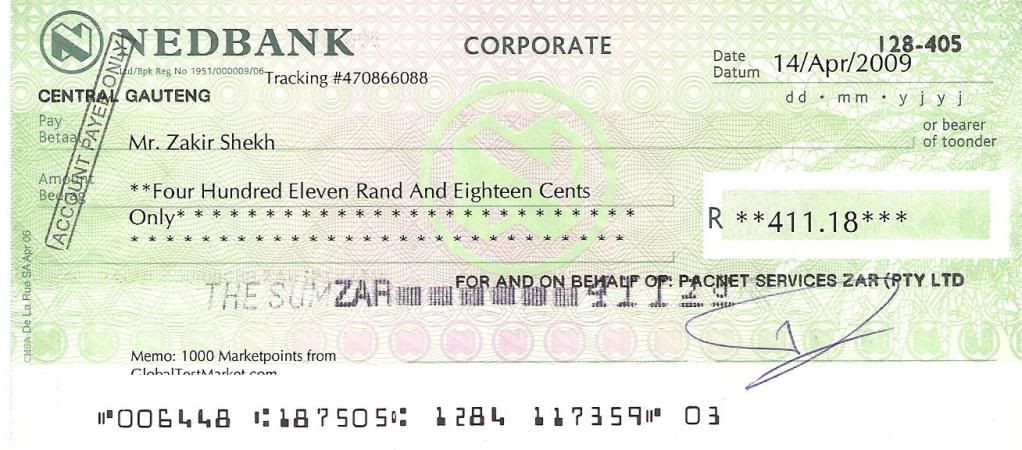
I got the image below from Photobucket. The description says that he got that check from GTM. Click to see full image.

GTM Cheque Pictures, Images and Photos
----------------------------------------------------------------------------------------------------------------------------------------------
Hope this post could help. :]
***I'll add the other sites on the coming days.


Look For More

free counters